What happens on each invoice
Your work does not change
You carry on invoicing in Cydoo exactly as you do today: same screens, same actions, same button to confirm. What follows happens afterwards, automatically.
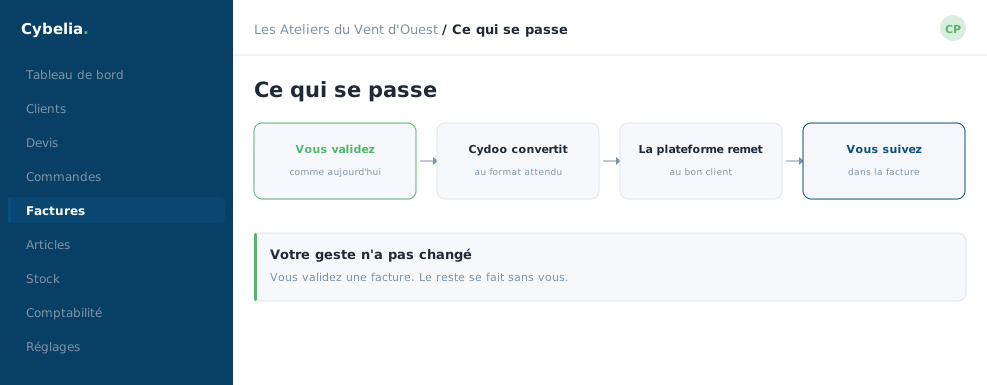 Four steps, only one of them yours: validate.
The six steps, in order
| Step | What happens |
|---|---|
| 1. Collection | The invoice confirmed in Cydoo is picked up. |
| 2. Conversion | It is put into the legal Factur-X format. |
| 3. Statements | Mandatory statements are added, including the mandate one. |
| 4. Checking | It is verified before sending. |
| 5. Filing | It is filed with the platform, which passes it on. |
| 6. Tracking | Its status is reported back in Cydoo. |
Step 4 is the one that saves you time
An incomplete invoice is flagged to you immediately, with the reason. Rather than being rejected three days later by your customer's platform, when you thought it had gone and the payment clock was already running.
It is the difference between "your invoice is refused" found out a week later, and "the routing code is missing" shown the second you confirm. The same problem, but one costs a month of cash flow and the other thirty seconds.
What Farida sees
Nothing new, most of the time. She confirms her invoice and moves to the next. When something is missing, a message tells her at once, in plain language, naming the field to complete. She corrects it, confirms again, and that is that.
You cannot send a non-compliant invoice by mistake. The check is systematic and blocking. It is a safeguard, not a constraint: it spares you the refusals, which give no warning.
In closing
Six steps, none of them yours. Your part stops at the confirm button, exactly as it does today; what follows happens on its own and is simply reported back to you.
Commenting is not enabled on this course.