The vocabulary, six words
Six words, and it all becomes readable
Six words are enough to follow everything. They come back on every screen in this course.
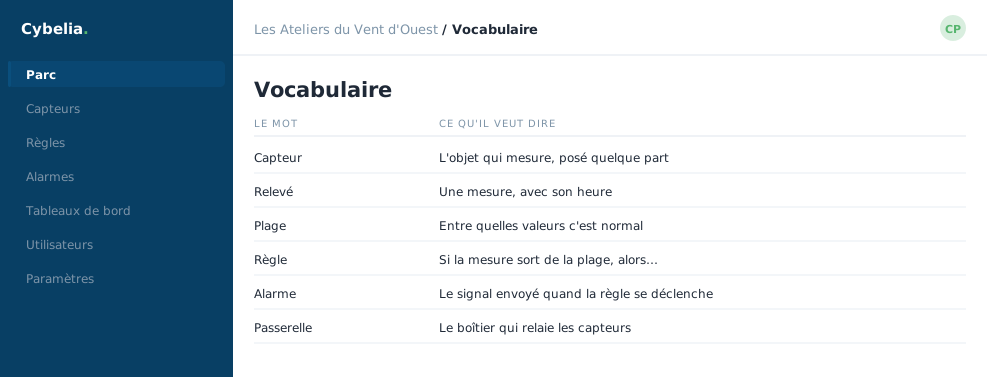 Sensor, reading, rule, alarm: four words, and no more.
Sensor
The small box fitted somewhere. It measures one thing and one thing only: humidity, temperature, an electric current, whether a machine is running or stopped. It decides nothing and triggers nothing: it measures and it sends.
Gateway
The relay box. Sensors, often wireless and battery-powered, talk to the gateway over a few tens or hundreds of metres. The gateway is the one plugged into the network, and it passes the readings on to Cybelia Cloud. One site, one gateway: that is the usual arrangement.
Reading
A measurement with a time on it: "kiln, 12% humidity, Tuesday 2:08 pm". Readings pile up to form the history, and therefore the curves.
Threshold
The limit you decide on. "Kiln humidity must not go above 14%." The threshold does not come from the tool: it comes from your trade. You are the one who knows what is acceptable.
Alarm
What appears when a threshold is crossed. An alarm has a severity, someone it is assigned to, and a status: open, in progress, resolved, closed. It stays visible until somebody has dealt with it.
Rule
The sentence that ties it all together: when this reading does this, then do that. "When kiln humidity goes above 14% for more than thirty minutes, then raise an alarm and tell Yanis."
Sensor → reading → threshold → rule → alarm → notification. The whole chain fits on that line, and there is nothing else to memorise.
In closing
Sensor, measurement, threshold, rule, alarm, notification: these six words are enough to read any screen in this course. No other jargon will be asked of you.
Commenting is not enabled on this course.