Users and their permissions
Three levels, not thirty
This screen answers one simple question: who can see what, and who can change what.
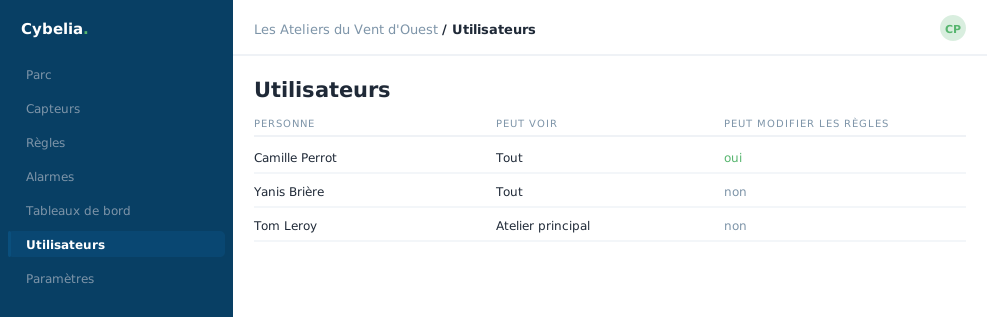 Who receives alarms, and who may change the rules.
Three levels, not thirty
Read. You consult sensors, curves and dashboards. You change nothing. That is Tom's level, and it is the right level for most people.
Operate. Read, plus taking on alarms and building dashboards. That is Yanis's and Farida's level: they use the tool every day.
Administer. All of the above, plus rules, thresholds and users. That is Camille's level, and Cybelia Cloud's. Give it to one or two people, not ten.
Every company in its own space
Your space is walled off. Your sensors, your rules, your users and your readings exist for you alone: no other company hosted by Cybelia Cloud can see them, and you cannot see theirs. This is not a setting somebody could switch off by accident, it is the way the tool is built.
Giving fewer permissions is not a lack of trust. It protects the person: you cannot be blamed for deleting something you were never allowed to touch. Everyone gains, the apprentice most of all.
When somebody joins or leaves
Someone joins: create the account, choose the level, and they get an email to set their own password. Someone leaves: disable the account, do not delete it. A disabled account can no longer sign in, but the name stays readable in the history of the alarms that person handled, otherwise the record becomes unreadable.
The screen not to forget
Read through this list once a year, or after any staff change. An account still sitting there three years after someone left is the kind of detail that bothers nobody until the day it bothers a great deal.
In closing
Read for those who look, write for those who adjust, administration for those who decide. Give the smallest level that allows the work; you can always add more.
Commenting is not enabled on this course.