Privileged accounts : the key safe
"Privileged accounts" page
Every company has a few accounts that can do anything: the one that administers the server, the one that runs the mail, the one for the management software. Those passwords often end up on a sticky note or in a shared file. This page gives them a proper safe.
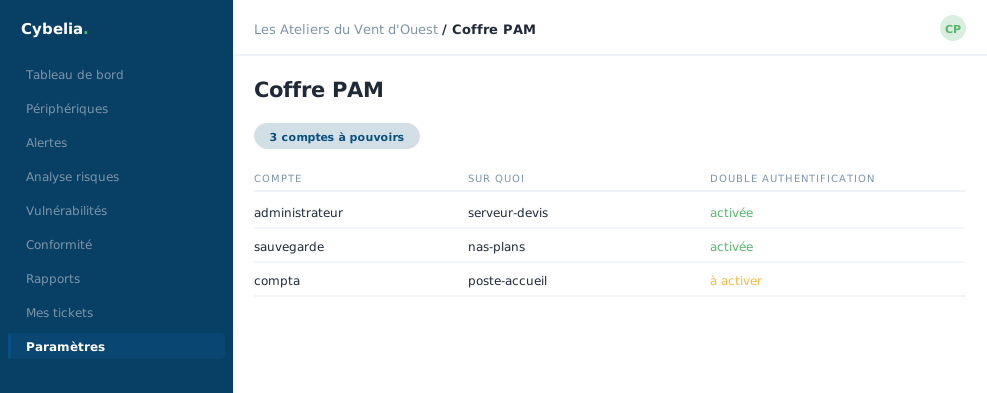 The key safe: the three privileged accounts, and their two-step sign-in.
What goes in it
Each entry carries a meaningful name, a target address, a username, and the secret itself. They are sorted by nature: local administrator, domain administrator, database, network equipment, online service, application. That classification is not decorative: it tells you at a glance which accounts are the most sensitive.
How the safe opens
To read a secret, two things are asked. First a six-digit code from your authentication app, the very one that protects your login. Then a reason: "work on the quotes server", for example.
The reason is not paperwork. It is recorded with your name and the time. The day someone wonders who touched what, the answer is written down, and it protects the honest person first.
Rotation
A button lets you change a secret and keep a record of it. The simple good practice: when someone leaves the company, rotate the accounts they knew. At Les Ateliers that happens once or twice a year, and takes ten minutes.
This page also counts towards your insurability score: an insurer looks precisely at whether privileged accounts are kept in a safe or not.
In closing
Accounts that can do anything deserve better than a shared file. A vault, regular rotation, and a record of who opened what: those are the three things an auditor will ask for, and the three that will save you.
Commenting is not enabled on this course.