The home screen, and finding your way
What is fine, what is not
Once signed in, you land on an overview: what is fine, what wants your attention, and the list of your sensors.
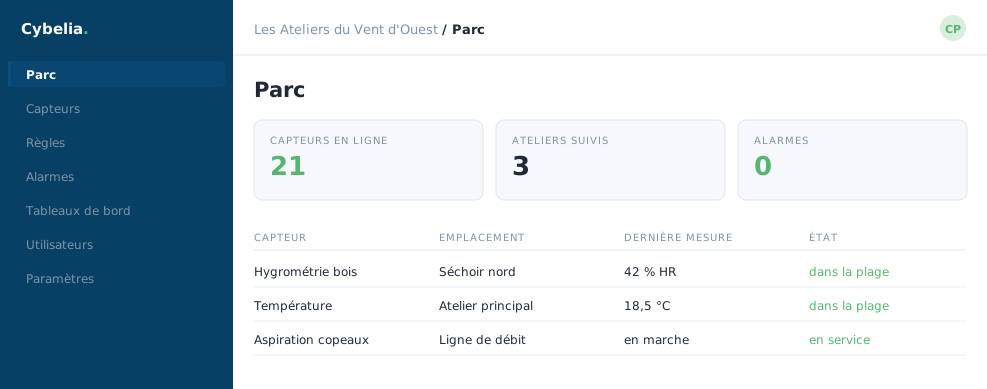 The sensor estate at Les Ateliers du Vent d'Ouest:
each row is one sensor, its latest reading and the time of that reading.
The sensor estate at Les Ateliers du Vent d'Ouest:
each row is one sensor, its latest reading and the time of that reading.
Three areas to get your bearings
The menu, on the left. It never moves. That is where you choose between the estate, the dashboards, the rules and the alarms. On a phone it folds away behind the three-line button.
The content, in the middle. It changes with whatever you picked. It is the main working area.
Your account, top right. Your name, the language of the interface, and the button to sign out.
How the estate is organised
Sensors are not dumped into one flat list: they are arranged in a tree, like folders. At Les Ateliers du Vent d'Ouest you first see the three sites, then within each site the areas, workshop, kiln, offices, and within each area the sensors. Every level folds and unfolds. It is this filing that lets you find a sensor in three seconds rather than three minutes.
Lost? Click the company name, top left. You always come back to the home view, whatever screen you were on. There is no room you cannot walk out of.
The first thing to do
On the day it goes live, take five minutes to unfold the whole tree and read the names. If one of them means nothing to you, "sensor 3" rather than "timber kiln no. 2", say so straight away: we rename it. A clear name beats a manual.
In closing
This screen is made to be looked at for three seconds. If it asks for nothing, close it: that is precisely the intended use.
Commenting is not enabled on this course.