The Mail screen
The first screen, the one you open in the morning
The envelope icon opens the mail. The folder column shows what your mailbox looks like: Inbox, Sent, Drafts, Junk, Trash, plus the folders you will have created. Those five cannot be renamed or deleted: they are the fixed furniture of the house.
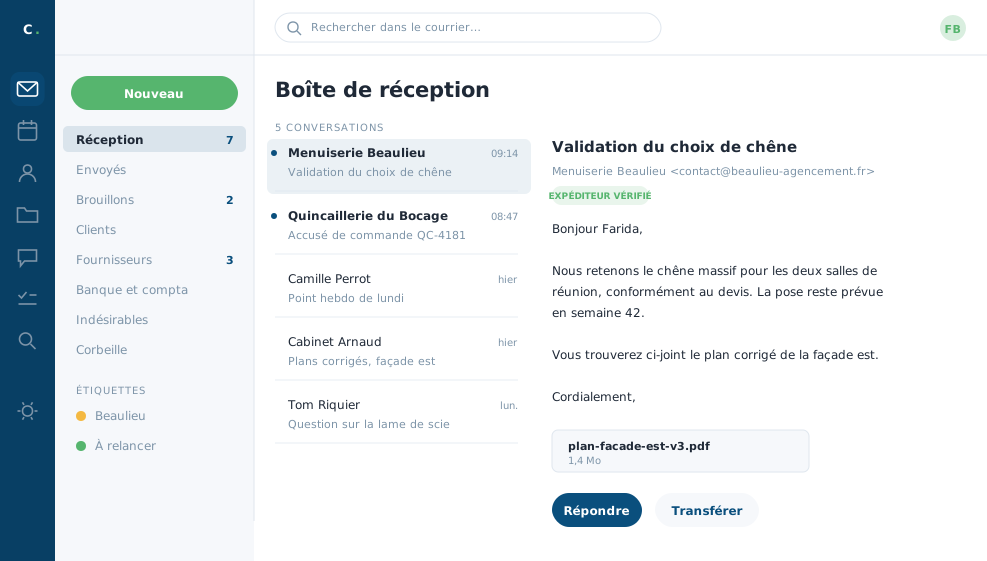 Farida's inbox, on an ordinary morning.
What the header tells you
Above the open message, a few markers deserve a glance. They flag that a message comes from a domain outside the company, that its origin has been verified, or that it arrives from a mailing list. That is where you spot a message passing itself off as a supplier.
Handling several messages at once
The selection icon, top left of the list, brings up a circle in front of every line. Tick what interests you, then open the three-dot menu at the top right: you mark, move, tag or delete the whole batch in one go. That is how Farida clears out Friday's newsletters in ten seconds.
The bin, and fishing things back out
A deleted message goes to the bin and stays there about a month, time enough to change your mind. You can drag it back out into whichever folder you want. Emptying the bin, on the other hand, is final on your side: only Cybelia support can then fetch the message from the backups.
The Junk folder deserves a weekly glance. The filtering is rarely wrong, but when it is, what turns up three days too late is a new customer's request for a quote.
In closing
This is the morning screen, the one you open first and keep open. Everything else in the tool is reached from the same bar, without ever leaving this page.
Commenting is not enabled on this course.