A sensor's record
A whole sensor on one page
Click a row in the estate and you get the record: everything Cybélia IoT knows about that sensor, on a single page.
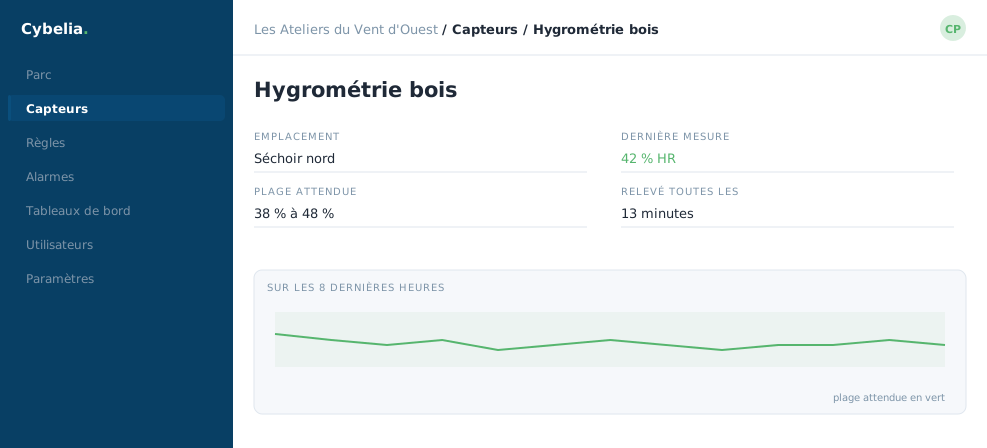 A sensor and its reading: as long as the line stays in the green band, all is well.
Identity
At the top, the name and where the sensor is. Often a point on a map too, handy when your sites are far apart. The name is edited here, if you have the right to: it is the one setting everybody wants to change on day one.
The readings
In the middle, what the sensor measures. A kiln humidity probe often shows two figures: humidity and temperature, since one cannot be read without the other. Each reading shows its value, its unit, and the time it arrived.
Alongside some readings you will find status information rather than physical quantities: battery level, radio link quality, time of last contact. These are not measurements of your trade, but they are what tell you whether you can trust the others.
The buttons
Depending on your permissions, the record offers to show the history of a reading, add it to a dashboard, or open the rules that watch it. Nothing here drives the machine: a temperature sensor does not heat, an electricity meter does not cut the power.
A single value means nothing on its own. 14% humidity, good or bad? It depends on your timber species and on what the piece is for. That is why the record always shows the history next to the value: it is the trend that speaks, not the number.
A real case
Yanis opens the "Kiln 2" record before downgrading a batch of oak. He reads 11% this morning, and the curve over the last ten days is coming down steadily. The batch is fine. Had he read 11% just after a sharp rise the day before, he would have waited twenty-four hours.
In closing
Identity, current reading, curve and thresholds: the record answers every question you might have about a sensor, without opening another page.
Commenting is not enabled on this course.