The mobile app and looking in from anywhere
Yes, from your phone
The question always comes up: "and from my phone?". The answer is yes, with nothing to install.
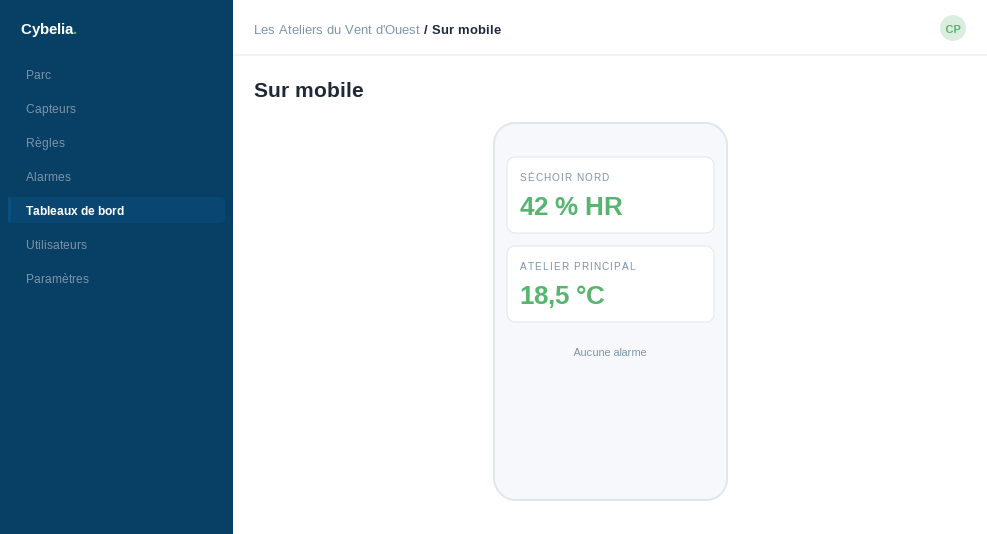 The same estate in your pocket, at night and at weekends.
No app to download
Your space's address opens in the phone's browser, and the layout adapts by itself: columns fold away, the menu slips behind the three-line button, the curves stay readable.
Add the page to the home screen and you get an icon like any other. There is no store to visit, no update to accept, and nothing to reinstall when you change phone: your account is all you need.
Notifications
Depending on the setup agreed with Cybelia Cloud, alarms reach you by email, and the phone displays them like any other message. That is deliberately simple: an email address works on every phone, does not break when you change handset, and can be forwarded to a colleague while you are on holiday.
On a phone you only do three things: read a value, look at the open alarms, take one on. Building a dashboard or writing a rule is done sitting down, at a proper screen. That is not a limitation of the tool, it is common sense.
From home, on the road, at a customer's
The tool is hosted by Cybelia Cloud, so there is nothing to open up on your network, no wiring to do, no configuration to request from your provider. An internet connection and a browser are enough, wherever you are.
Jack's Sunday evening
The kiln runs at weekends. Around 10 pm on the Sunday, Jack opens the shortcut on his phone, reads 12.4%, and closes it. Thirty seconds. That is what everything you have just read replaces: a drive back to the workshop, or a night spent wondering.
In closing
No app to install, no extra account: the same address opens in your phone's browser and adapts. That is what lets you check the drying room on a Sunday evening without going out.
Commenting is not enabled on this course.