Where to enter them in Cydoo
Two fields, once and for all
Everything happens on each customer's record, in the tab devoted to electronic invoicing. Two fields, once and for all.
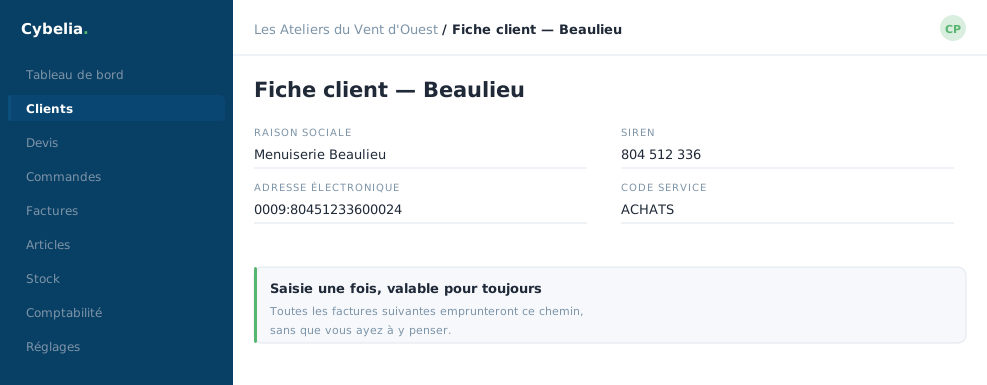 The exact field, on the customer record: entered once, valid thereafter.
| Information | Field in Cydoo |
|---|---|
| Recipient's registration number | Customer identification |
| Routing code | Routing code |
A default value, not a fixed one
The routing code entered on the customer record is a default: it is the one used if nothing else is specified. It remains changeable, and that matters.
The same customer may impose a different code depending on the warehouse, branch or site concerned. You can therefore carry a routing code on a quote or on a contract: that one is then used on the resulting invoice, in place of the customer record's.
The rule, in one sentence
The most specific code wins. If there is a code on the quote or the contract, that is the one. Otherwise it is the customer record's. You have nothing to decide at invoicing time: Cydoo applies the rule on its own.
At Les Ateliers du Vent d'Ouest
One of their customers, a distribution group, imposes a code per depot. Farida entered the head office code on the record, which serves in most cases, and carries the depot code directly on the quotes for the sites concerned. She no longer thinks about it: the quote carries the right code, and so does the invoice.
You cannot break anything by correcting these fields. As long as an invoice has not been sent, everything can be changed. And a corrected customer record immediately benefits every later invoice.
In closing
It all happens on the customer record, in the electronic invoicing tab. Once the two fields are filled in, you will only come back if your customer changes platform.
Commenting is not enabled on this course.