Vulnerabilities : the updates that are missing
"Vulnerabilities" page
A vulnerability is a known flaw in a piece of software, published by its vendor with a number. It is not an attack: it is a door the vendor has flagged, and for which it offers a repair. This page lists the ones still present on your machines.
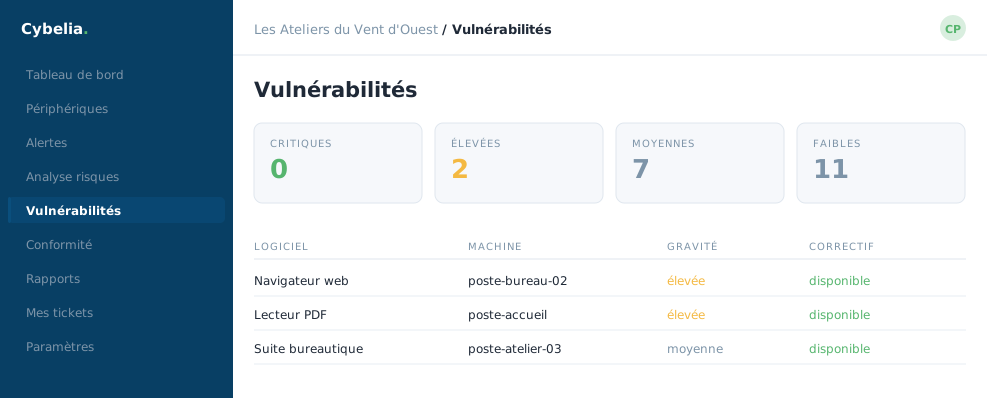 The missing updates, sorted by severity: none critical here.
What the screen shows
Four counters at the top: how many critical, high, medium and low flaws. Below, a table: the flaw's number, its severity, the machine concerned, the software, its version, and the publication date.
Sorting is by severity and by machine, and a search box finds a specific number. Everything can be exported, which is handy for handing the list to whoever will apply the updates.
A non-zero figure is normal, and even healthy. Every IT fleet in the world has vulnerabilities pending: vendors publish new ones every week. What matters is that the critical ones go down quickly, and that there is an update rhythm. At Les Ateliers, security updates are applied on Fridays.
Turning detection on
A button at the top right starts or stops the scan. On first activation, the screen honestly warns that results will take about twelve hours to arrive, the time of the first full pass. An empty table on day one is therefore not a bad sign.
Three messages that look alike
"Detection not enabled": the button was never pressed. "No vulnerability detected": the scan is running and found nothing. "Data unavailable": the scan has not finished its first round. None of these three messages is an alert.
In closing
A vulnerability is not an attack: it is a door flagged by the vendor, with its fix. Deal first with those that are critical and exposed; the others can wait for the next patching round.
Commenting is not enabled on this course.