Alerts : the list of what was noticed
"Alerts" page
An alert is a line saying: "this deserves a look". Nothing more. The page gathers them all, most recent at the top.
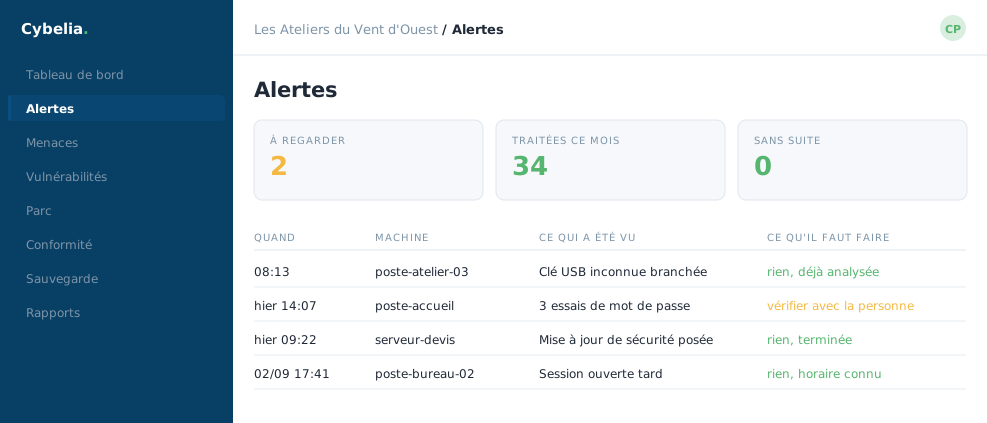 Today's alerts, and above all what to do about each one.
Filtering down to what matters
Four filters, freely combined: the severity (low, medium, high, critical), the device concerned, and a set of buttons for Open / Resolved / All. A free-text search completes the set.
The useful habit takes one move: set "Open" and "High or above". What remains is exactly what concerns you. At Les Ateliers that filter leaves nothing at all, and that is the case most days.
An alert is not an incident. It is an observation. Most describe ordinary things: a USB stick plugged in, a program installed, a password mistyped. They exist so you can go back over them if needed, not to worry you.
Is an empty page a bad sign?
No. The message "No alerts at the moment" means what it says. It can also happen, on a brand-new workspace, that the link to the analysis engine is not yet connected, the screen then says so plainly, with what to do about it. A word to Cybelia support settles it.
And if an alert comes back every day?
That is a sign it describes normal usage at your site. You declare it once as not relevant, see the lesson on exclusion rules, and it stops asking for your attention, while remaining available to consult.
The list is browsed page by page, and the counter at the bottom recalls how many alerts match your filters.
In closing
An alert is not an incident: it is an invitation to look. Filter on high and critical severities to begin with, and deal with the rest when you have the time.
Commenting is not enabled on this course.