Exclusions : silencing what is normal at your site
"Exclusion rules" page
No security tool knows your habits. It sees a machine connecting to all the others every night and finds it odd. You know it is the backup. This page exists for exactly that: to say once, "here, that's normal".
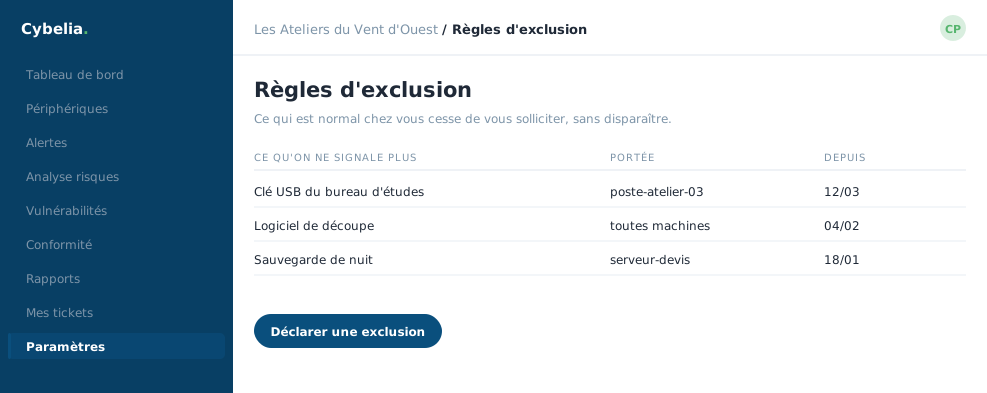 What is normal at your site stops asking for you, without ever disappearing.
Three things you can set aside
A rule: a whole type of alert, on one machine or on all of them. One specific alert, just that one. A vulnerability, when the software concerned is not in use.
The form asks for the type, the target, optionally the machine, and above all a reason. That reason is not a formality: it is what you will read again in six months to know why you set that line aside. An expiry date can be set, so the exclusion does not become eternal.
This is not sweeping dust under the carpet. An exclusion is traced, dated, justified and reversible in one click. It makes the remaining alerts readable: that is what makes people still look at the screen six months later, instead of ignoring it.
Four counters showing the effect
At the top: the number of active exclusions, the risk points thereby removed, the rules set aside, the vulnerabilities set aside. The page also shows your risk score before and after.
That gap is honest and openly displayed: you see exactly what your decisions changed, in both directions.
An exclusion can be switched off at any time without being deleted, a simple toggle. And a "Show inactive" filter lets you review the whole history of your decisions.
In closing
A well-placed exclusion silences one noise, not a whole family of alerts. Rule out the specific case, date it, and review your exclusions once a year: what was normal last year is not always normal now.
Commenting is not enabled on this course.