A machine's detail page
"Device detail" page
Click a machine in the equipment list and you get its full record. This is the page to open when someone asks you "what exactly is on this computer?".
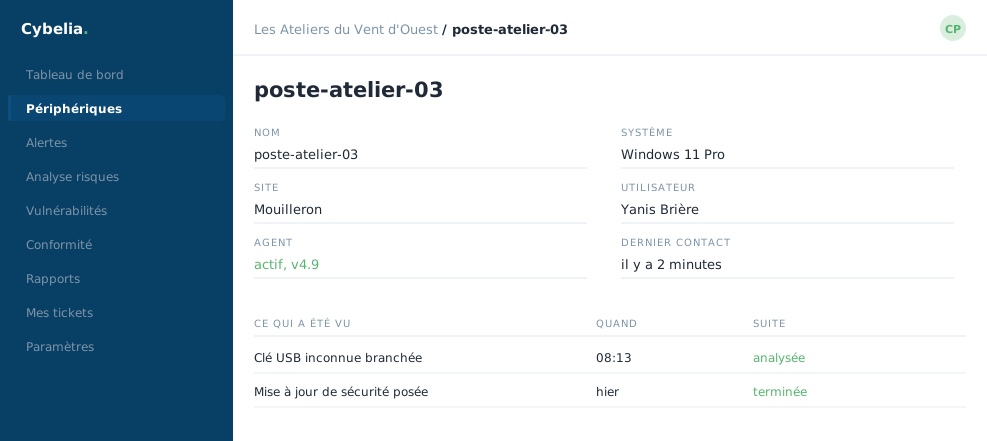 A workstation's record: its identity, its agent, and what has been seen on it.
Five panels
Information: the system, the agent version, the address, the state, the last activity, and the groups the machine belongs to.
Hardware: the processor, the number of cores, the memory, the network cards, and how many programs are installed. Useful for deciding whether a machine is due for replacement.
File integrity: how many files were added, changed or deleted in the watched folders. An ON/OFF button turns this watching on or off for this machine alone.
Configuration assessment: this machine's score against good settings practice, with the date of the last analysis.
Vulnerabilities: the known software flaws found on this machine, sorted by severity.
Figures at zero do not mean "nothing works". A recently equipped machine has not been analysed yet. A note saying "no policy configured" or "not configured" simply flags an option that has not been switched on yet, not a problem.
The "Force rescan" button
It immediately restarts the inventory and the analyses on the machine, instead of waiting for the next automatic pass. New data arrives one to three minutes later.
It is a harmless action: it does not restart the computer and interrupts nobody's work. Use it after applying an update, to see the result straight away rather than waiting.
In closing
This is the page to open when someone asks what exactly is on a machine. Everything is dated, which lets you answer with facts rather than with a recollection.
Commenting is not enabled on this course.