Defence : the blocked addresses
"Defence" page
When an outside address insists too much, for instance by trying passwords in a row, it is automatically set aside for a while. This page shows who is set aside, since when, and why.
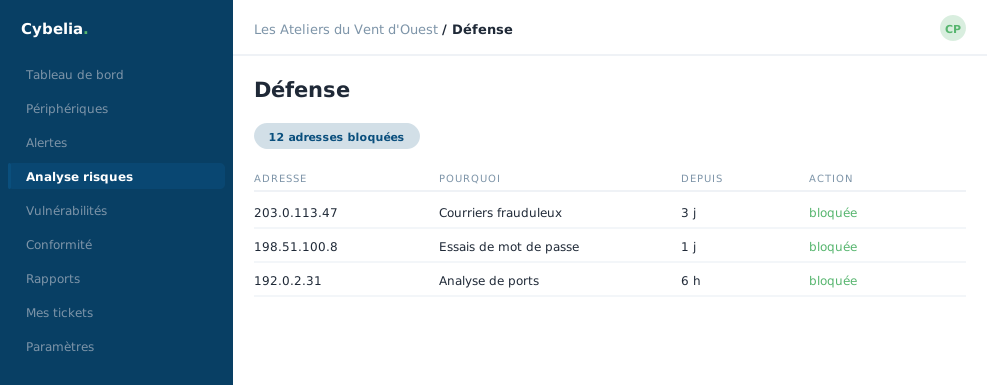 The blocked addresses: which one, why, and since when.
Two lists
Currently blocked addresses: the address, the reason, the machine concerned, the time of blocking. These blocks are temporary and lift by themselves.
Permanent allow list: addresses that must never be blocked, whatever happens. This is where you put the office's fixed address, the accountant's, and that of the contractor who works remotely.
The useful action
If a legitimate address ends up blocked out of over-zealousness, two buttons are offered. Unblock only lifts the block this once. Unblock and add to the allow list lifts it and stops it happening again. For the office address, pick the second.
A reassuring note, written on the page itself: depending on the chosen configuration, alerts may be logged only, that is, recorded without any automatic action being taken. Nothing cuts itself off without someone having decided so.
What you usually see
At Les Ateliers, the block list is empty most of the time, and the allow list holds three lines: the La Roche-sur-Yon office and the two other sites. That is the normal state of a small company.
A "History" tab keeps a record of every past block, with its reason. You go there to understand, not to act.
In closing
Automatic blocking works without you and lifts by itself. This page is only worth opening in one case: when someone of yours can no longer connect and you are looking for the reason.
Commenting is not enabled on this course.