The equipment list : your machines
"Monitored devices" page
This is the living inventory of what is being watched. Each line is a machine: its name, its address, its system, the agent version, and the last time it made itself heard. The list refreshes on its own every thirty seconds.
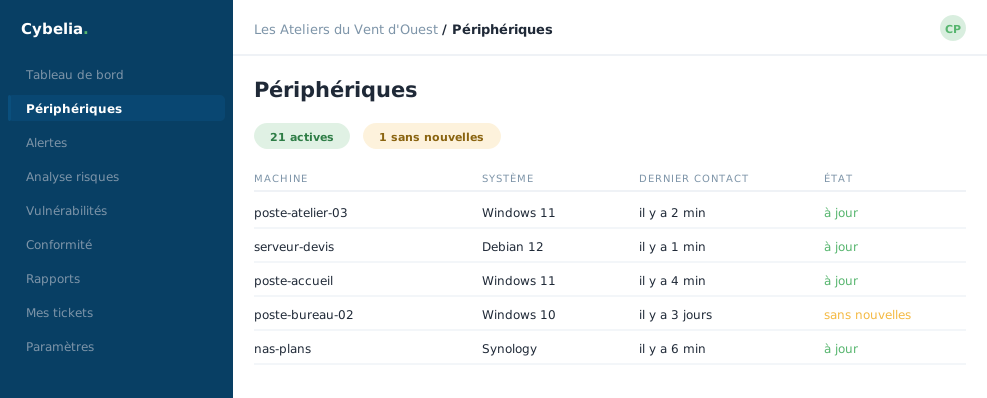 The estate at Les Ateliers: 21 active machines, and the one silent for three days.
Three ways to look
Three buttons change the display: as a grid (one tile per machine, nice for a small fleet), as a list (a dense table, for comparing), or on a map. The 21 machines at Les Ateliers fit comfortably in the grid.
A word about the map: it only shows machines with a public address. Computers on an internal network, that is, nearly all of yours, do not appear on it. An empty map is therefore not a problem.
The three states
| State | What it means |
|---|---|
| Active | The machine is talking. All is well. |
| Disconnected | It has gone quiet. Nine times out of ten: switched off, or on holiday with its owner. |
| Never connected | The agent was installed but has not spoken yet. Often a pending restart. |
"Disconnected" is not a security alert. A laptop switched off over the weekend shows as disconnected on Monday morning. What deserves a look is a machine meant to run permanently, a server, staying silent for several days.
Sorting into categories
A panel on the right lets you create categories and file machines into them. At Les Ateliers: "Workshop", "Offices", "Servers". Three clicks, and Yanis sees only his three computers.
Lastly, an orange banner may flag agents removed from the portal whose program may still be running on the machine. It gives the identifiers concerned and the uninstall command. That is housekeeping, not an emergency.
In closing
The estate is your living inventory. The column to watch is not the name but the last activity: a machine that has not spoken for three days is not necessarily broken, but it is no longer protected.
Commenting is not enabled on this course.