The overview : /dashboard
The portal's home screen
This is where you land after every sign-in. It does no work: it shows. At a glance you know how many databases you have, how many tickets are open, and whether a go-live is waiting on a decision.
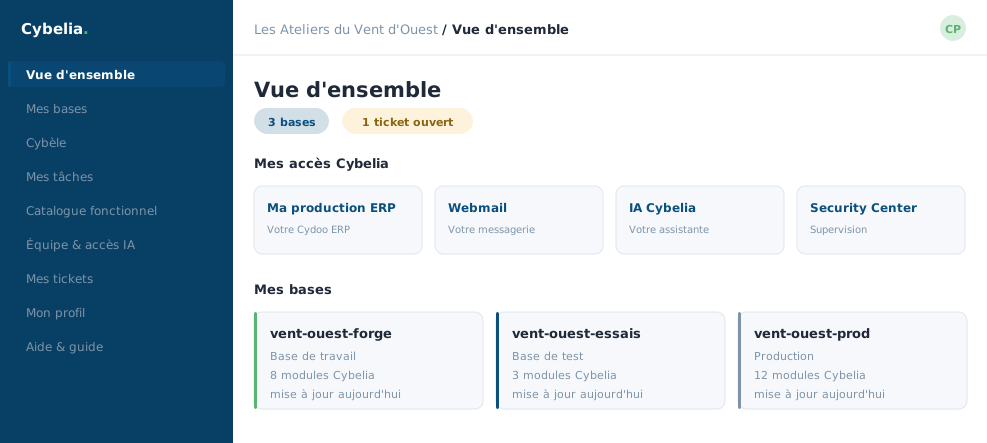 The overview at Les Ateliers du Vent d'Ouest: three databases, one open ticket, and the Cybelia Cloud services.
The first time
A welcome box opens on your first visit and sums up the journey in four steps: explore a demo, create a database, switch on business features, then run a customisation project. One button closes it and it never returns. It does nothing else.
The strip of figures
Three pills: how many databases, how many tickets are still open, and, only when there are any, how many go-lives are pending. At Les Ateliers du Vent d'Ouest, Camille usually reads "3 databases, 1 open ticket" and has nothing else to check.
My Cybelia Cloud services
A row of cards that open your other services in a new tab: your production Cydoo ERP, your mailbox, the Cybelia Cloud AI and the Security Center. It is a shortcut, not a dashboard for those products: each has its own.
What the overview does not do: it changes nothing. No button on this screen touches a database. It is a starting point, and it is safe.
Your databases, as cards
Further down, each database appears as a card: its name, its type, how many Cybelia Cloud modules are installed, the date of the last update. The working database always comes first, because it is the only one that pushes to production. Below the cards, your recent tickets and recent go-lives act as a memory.
In closing
The overview does not work: it shows. It is the glance screen, the one that tells you whether there is anything to decide today. If nothing is flashing, close it again without a second thought.
Commenting is not enabled on this course.