My team : /team and /team/add
Two things often confused
Being a contact of your company means appearing in its address book. Having portal access means being able to sign in to Forge. The first does not imply the second, and this screen keeps them clearly apart.
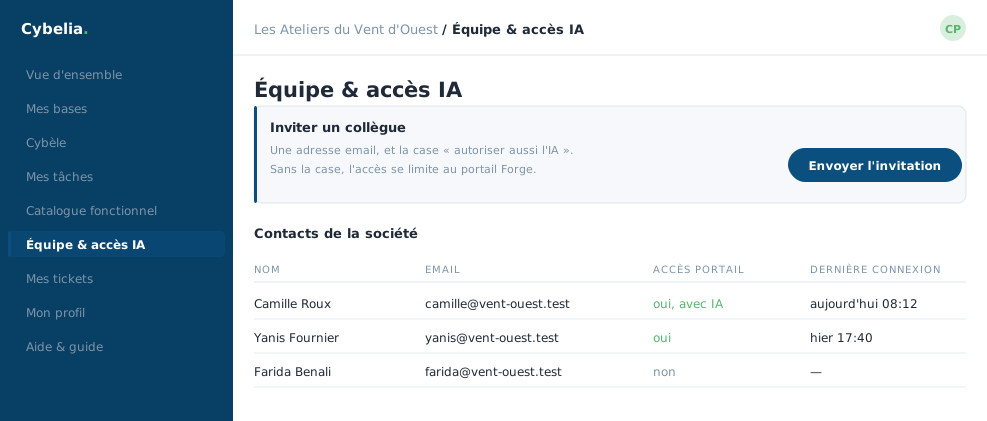 The team: who is a contact, who has portal access, and to which databases.
The list, /team
A table of the people attached to your company: name, email address, and a column saying whether they can sign in to the portal. Each row carries two possible actions: resend the invitation, or grant and revoke portal access.
You cannot revoke your own access. The portal refuses and says so. It is a safeguard: nobody shuts the door on themselves by accident.
Adding someone, /team/add
A short form: the name, the email address, and a "can sign in to the portal" checkbox. Without the box, you create a contact, useful for assigning tasks. With the box, the person receives an invitation email that leads them to choose their own password. You never have to invent one for someone else.
Three possible answers after sending. The address is malformed: the screen says so and nothing is created. The person already exists: the portal tells you rather than making a duplicate, and offers to open access for them. Otherwise the person is added and the invitation goes out.
Do not mix them up
The accounts on this screen are for the portal. Users who work inside the ERP are created inside the ERP itself, and are counted in your contract. They are two different address books.
At the workshop, Camille and Farida have portal access. Yanis is a contact and receives tasks. Tom is a contact too, for the length of his apprenticeship.
In closing
Being a contact and having access are two different things: the first puts you in the address book, the second opens the door. Removing access does not delete the person, which is exactly what you want when someone changes role.
Commenting is not enabled on this course.