Invoices : the record of what was paid
"Invoices" page
One table, five columns, nothing more: the reference, the issue date, the due date, the amount including tax, and the balance outstanding. This is the page Farida opens once a month.
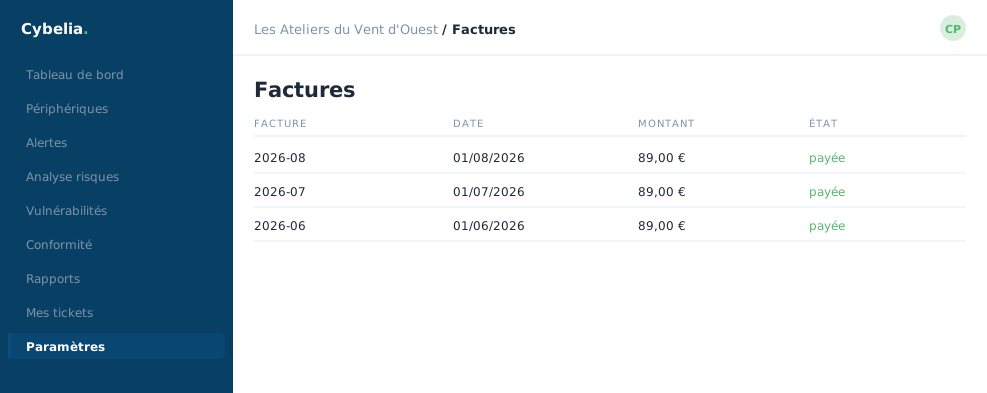 The invoice history: what was paid, and when.
Four states
Paid, the normal case. In progress, the payment has left but not yet cleared. Partial, a deposit has been paid. Unpaid, a due date is waiting.
The "outstanding" column is the one to watch: zero everywhere means there is nothing to do.
This table is an informative summary. Your full accounting documents, signed invoices, credit notes, payment receipts, are in your Cydoo management area, reachable by a link from this page. That is where your accountant will fetch the originals.
If the table is empty
That is normal before the first payment: the page explains it and says your invoices will appear here afterwards. No cause for concern, nothing has been lost.
The good habit
On the 5th of each month, Farida opens this page, checks that the month's line reads "paid" and closes it again. Thirty seconds. The day a line stays "unpaid", expired card, limit reached, she sees it before access is suspended, and fixes it calmly.
A useful reminder: an unpaid invoice suspends access after the due date, but reactivation is immediate on settlement. Nothing is lost, neither the data nor the history.
In closing
Five columns, four statuses, no surprises. This is the once-a-month page, and the outstanding balance is always the column to look at first.
Commenting is not enabled on this course.