Install, follow, remove : /install, /status and /uninstall
Installing, /playbooks/{feature}/install
One click on "Install". The page does not freeze and does not leave you staring at a blank screen: it returns straight to the detail page, where the action area now reads "Installing". The work carries on at Cybelia Cloud's end while you do something else.
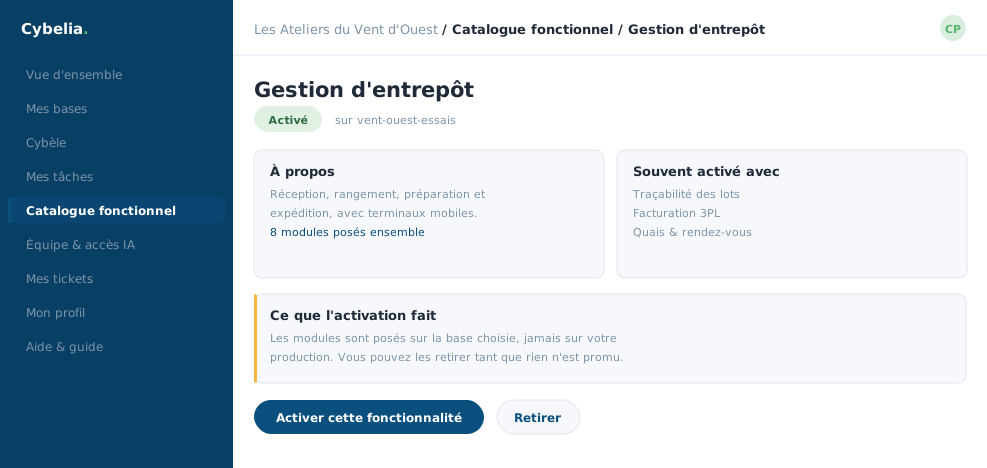 A feature's record: what it does, what it requires, and the button to install it.
An installation usually takes from one to a few minutes. The portal prevents two running at once on the same database: the second button greys out, with the reason written beside it.
Following it, /playbooks/{feature}/status
This is the address that redraws the action area every few seconds, without reloading the page. You see "in progress", then "installed", or the error message if there is one. The refresh stops on its own once the outcome is known, it does not run forever.
If you close the tab and come back the next day, the page shows the real current state. And if an installation were stuck for no reason, the portal notices when the page is reopened and puts the action area back into a coherent state, rather than leaving you with an eternal "in progress".
An installation erases no data. It adds screens and fields. Your existing quotes, customers and entries do not move.
Removing, /playbooks/{feature}/uninstall
The same mechanism in reverse: one click, an immediate return to the page, a status that refreshes itself. Removing a feature removes its screens; data that only existed because of it goes with it, and the page warns you beforehand.
The action is not offered on every database. On a database derived from production, installing and removing go through the team: the same caution that applies to anything touching your real operations.
Tom installed a feature out of curiosity on the sandbox, removed it ten minutes later, and nobody at the workshop noticed. That is exactly what a test database is for.
In closing
An installation takes one to a few minutes and does not tie you up: the page hands control straight back. The portal prevents two at once on the same database, and writes the reason next to the greyed-out button.
Commenting is not enabled on this course.