Delete, restore, clear away : /bases/{db}/delete, /restore, /forge/discard/{db}
Three neighbouring actions, not to be confused
They have no screen of their own: they are buttons on the database list and on a database's record. But each does one precise thing.
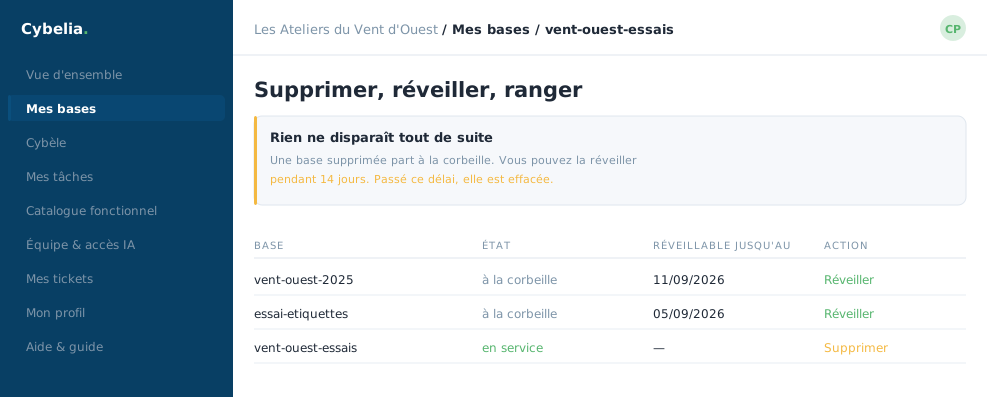 The bin: deleted databases, and how many days are left to change your mind.
Delete, /bases/{db}/delete
The red button on test databases. It destroys nothing: it moves the database to the bin, where it waits fourteen days. The portal first asks you to type the exact name of the database. If what you type does not match, nothing happens and a message says so.
This button only exists on test databases. Your working database cannot be deleted from this screen: that is a guard rail, not an oversight.
Restore, /bases/{db}/restore
The bin's button. One click, no confirmation, and the database is usable again exactly as it was: nothing had been erased during its stay. It reappears in the list, with its data and its modules.
What "delete" really means here: setting aside. For fourteen days the mistake is undone with a single click. After that, the erasure is real, which is why the countdown is shown in plain figures in the bin.
Clear away, /forge/discard/{db}
This one only concerns databases whose creation failed. A failed database does not really exist: there is nothing to put in the bin. The "Clear away" button simply removes the line from the list, so you no longer have a red row in front of you. The "Try again" button next to it takes you back to the creation form.
At the workshop, Yanis had launched two creations in a row one Friday evening; one failed, and he cleared it away on Monday morning in ten seconds.
In closing
Delete moves to the bin for fourteen days, restore brings it back, discard cancels a creation that failed. None of the three destroys on the spot: that is deliberate, and it is what makes experimenting possible.
Commenting is not enabled on this course.