Declaring a false positive : teaching the tool your habits
Assistant's "False positives" tab
A false positive is an alert that is right about the facts but wrong about the meaning. The machine did see what it describes, but at your site, that is normal. This tab is there to say so once and for all.
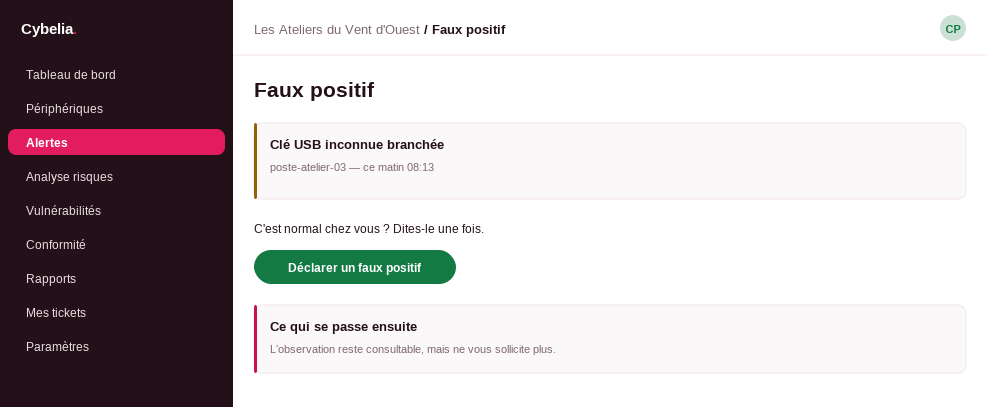 Declaring a false positive: the observation stays, but stops asking for you.
Three things you can declare
A detection rule, by its number or title, leave the machine blank to apply it everywhere. A specific alert, by its title or identifier. A vulnerability, by its reference, when the component concerned is not used at your site.
The form then asks for the device concerned, left blank, it applies to all machines, and above all why. An example of a good reason: "this server is administered remotely by our contractor, these connections are legitimate".
This page and the "Exclusion rules" page meet in the middle. One starts from the conversation with the assistant, the other from the alert list. The result is the same: a risk score that reflects your reality, not a theoretical ideal.
The visible effect
At the top of the tab, two figures: the number of active false positives and the number of risk points removed. Your adjusted score is shown next to the raw score. Nothing is hidden: you see what your decisions changed.
The right rhythm
Declare as you go, whenever an alert makes you say "oh yes, but that's us". Two or three declarations in the first month, then almost none: at Les Ateliers there were four in a year, and the alert list became readable from the second one on.
In closing
Reporting a false positive teaches the tool your habits. Each report reduces the noise of the following weeks, and a tool that stays quiet when all is well is a tool you listen to when it speaks.
Commenting is not enabled on this course.