Connectors : what comes in on its own
The /connecteurs page
Documents are filed by hand; connectors go and fetch. A connected source feeds the corpus on its own, at the chosen frequency, without anyone uploading anything.
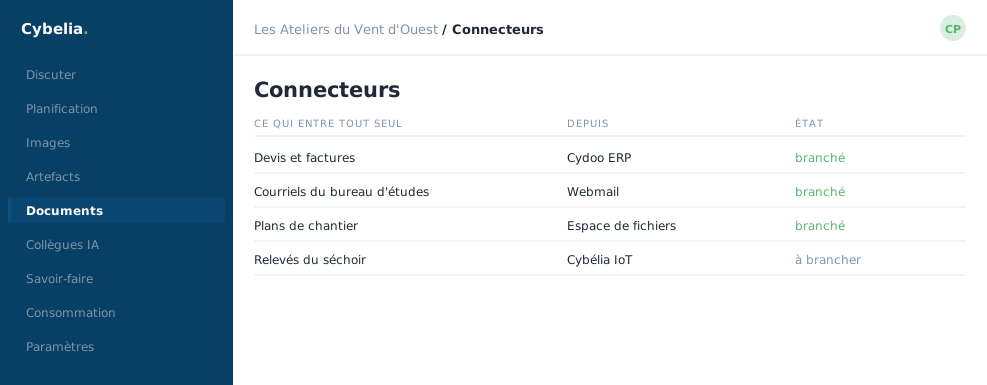 Four sources plugged in: what comes in does so on its own.
What can be connected
The catalogue is arranged by family: your Cybelia Cloud products; file shares and online storage spaces; code repositories; documentation (a website, an internal wiki, a feed); project management tools; mailboxes and chat spaces; databases.
One connector, one space
Connecting a source creates the space that goes with it. Permission follows the space: whatever a connector brings down is read only by those holding that space's role. The joinery's accounting share feeds the Accounting space, and Tom will see none of it.
The frequency, and what happens on each run
Daily at a set time, or weekly. On each pass, only what has changed is picked up; whatever has disappeared at the source disappears from answers. Each run leaves a line: what came in, what was skipped, and why.
Credentials never come back out. A password or key typed here reads
back on screen as •••••• and nothing else. To change it, you
retype it; to check it, you test the connection.
Advice for getting started
Start small. One share, the one holding procedures. Look at what came in on the first pass, and what was skipped. A connector pointed at an entire file server also brings back the 2019 drafts, and a cluttered corpus answers less well than a tended one.
In closing
A connector saves the Monday-morning upload. Connect the source that changes most often first; that is the one whose automation shows soonest.
Commenting is not enabled on this course.