Artefacts : the files it produces
The /artefacts page
When you ask for a table, a report or a presentation, your AI does not just describe the result to you: it builds the file. You find it here, ready to open in your usual spreadsheet or word processor.
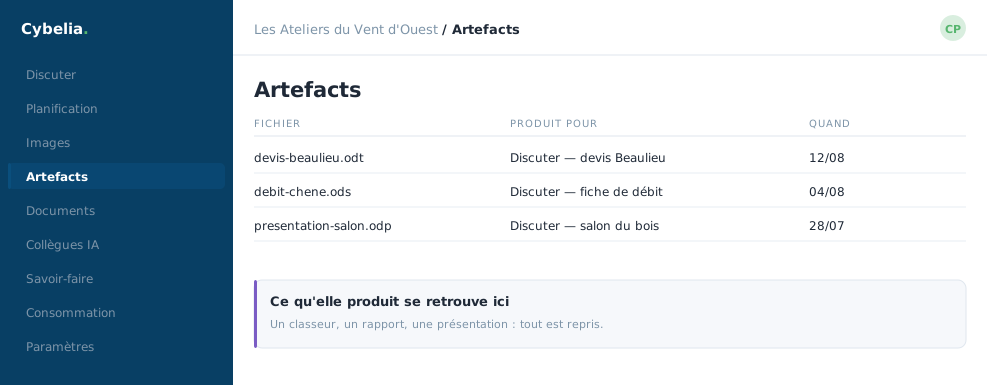 The files it produced end up here, with where they came from.
How to get one
Ask for it in plain words, in a conversation: "make me a table of turnover by customer", "turn these minutes into a presentation". The file appears in the exchange and is filed here at the same time. Nothing is uploaded from this screen: an artefact is what the house produced, not what you bring to it.
Four formats
Workbook (.xlsx), document (.docx), presentation
(.pptx) and .csv table. In a workbook the numbers
are real numbers: your formulas and totals work, which would not be the
case if the figures arrived as text.
An artefact is kept for one month. After that it deletes itself. The screen warns you as the deadline approaches. If the file matters, download it and store it where you store your working documents.
This library is yours
Like your images. Neither your colleagues nor an administrator can reach it. A table produced for payroll does not open from the workshop on the grounds that it is the same company.
An artefact is not a document
It does not join the corpus, and your AI will never cite it as a source: it must not mistake its own drafts for established knowledge. Anything that should serve as a reference goes into Documents.
The reflex
Always read a produced table again. The totals especially. An AI lines columns up very well and occasionally slips by one row, it is quickly spotted and quickly fixed, if you look.
In closing
A file beats a description of a file. Ask for the format in plain words, spreadsheet or document, and you get back something you can open, correct and send on.
Commenting is not enabled on this course.