Your first sign-in : /onboarding
The link you receive by email
You do not find this page by browsing: Cybelia Cloud sends you a personal link once the contract is signed. The link works once and has an expiry date, if it has run out, the screen simply says so and asks you to request another. Nothing is lost.
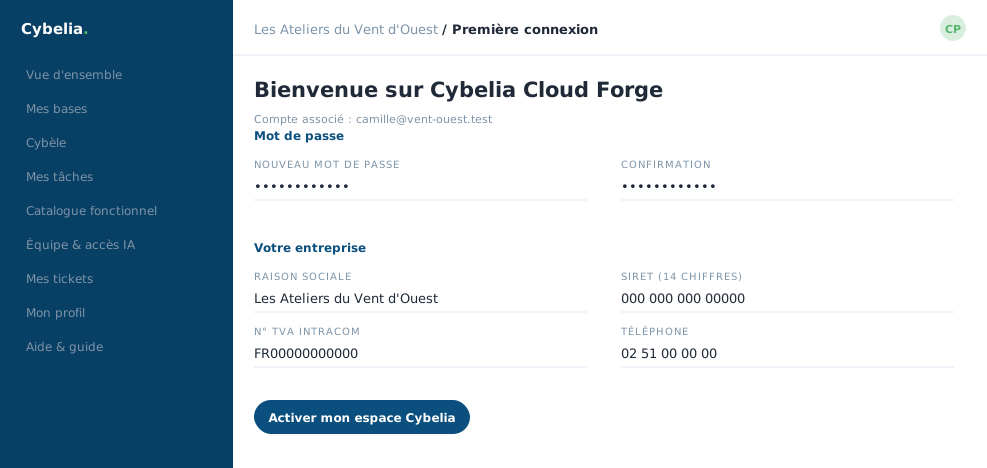 Day one's welcome page: your password, and nothing else to decide.
What the page asks for
Two things, in this order.
Your password, typed twice. Eight characters minimum. You choose it: Cybelia Cloud does not know it and cannot read it.
Your company details: legal name, company registration number, VAT number, the main contact (first name, surname, phone) and the full address. Farida filled this in for Les Ateliers du Vent d'Ouest in three minutes, with the sales file open beside her.
Why these fields: they are the ones that will appear on your invoices and on your contract. Entering them here means nobody asks you again later, and, more importantly, that nobody mistypes them.
What happens when you submit
The password is saved, your company record is completed, the link is used up, it will no longer work, and your session opens straight away. You land on the overview without having to sign in again.
If a field is rejected, the page comes back with the error in plain words above the form, and what you typed is kept. A thirteen-digit registration number, for instance, is flagged before saving, not after.
Link expired, email never arrived, company already registered under another name? Write to Cybelia Cloud support: a new link is sent the same day.
In closing
A first login comes down to two steps: a password only you know, and your company details. If the link has expired, ask for another; nothing is lost and it is not a mistake.
Commenting is not enabled on this course.