A database's record : /forge/db/{db}
Everything about one database, on one page
The database list gives you the essentials. This record gives you the rest. At the top: the name you chose, where it came from, a demo clone or an empty database, and when it was created. Four boxes follow.
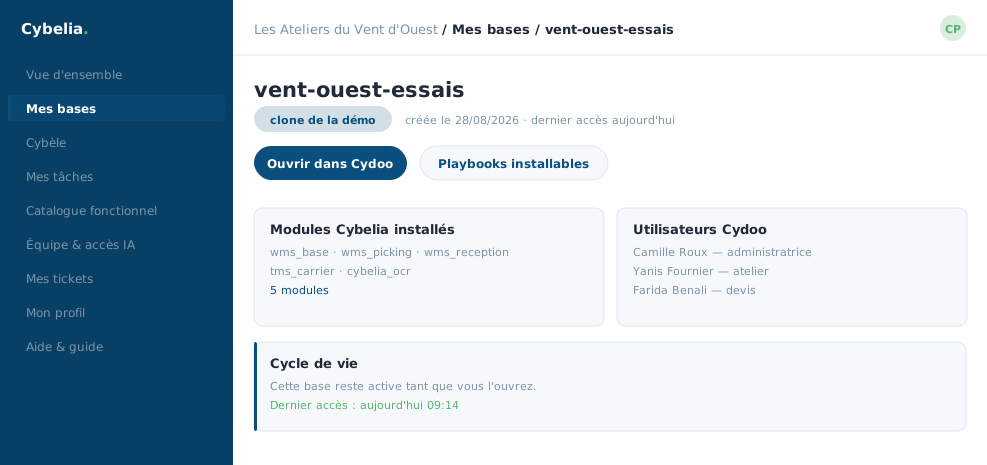 A database's record: where it came from, its size, its installed features, and what you can do with it.
Access the database
The sign-in details to use, the button that opens the ERP, and the delete button. Deleting asks you to type the exact name of the database into a small window: that is deliberately tedious, so nobody ever does it out of reflex.
Installable features
A link to the catalogue, pre-filtered on this database. On a test database you switch on whatever you like with one click. On a working database, the box reminds you that these activations belong on scratch databases.
Users
A useful reminder: your business users are not created in Forge but in Cydoo itself, through its configuration menu. They are two separate directories. It took Farida a month to stop having to think about it; it is written here.
Life cycle
A database stays alive as long as you use it. After a year with no access at all, an email warns you. If nothing happens within fourteen days, the database is deleted. Opening it once resets the counter, which is exactly what the "Open" button does.
The date of the last access is shown just below, so you can check it yourself rather than take our word for it.
In closing
A database's record gathers on one page everything about it: where it comes from, how to connect, and how to get rid of it. That deletion requires retyping the name is not gratuitous friction: it is what stops you doing it by reflex.
Commenting is not enabled on this course.