Choosing where the copy lands : /bases/rapatrier
One page, one question
You are about to fetch an up-to-date copy of your production. What remains is where it lands. Both paths are shown side by side, with what each costs, because nobody can choose between "replace" and "alongside" by reading database names.
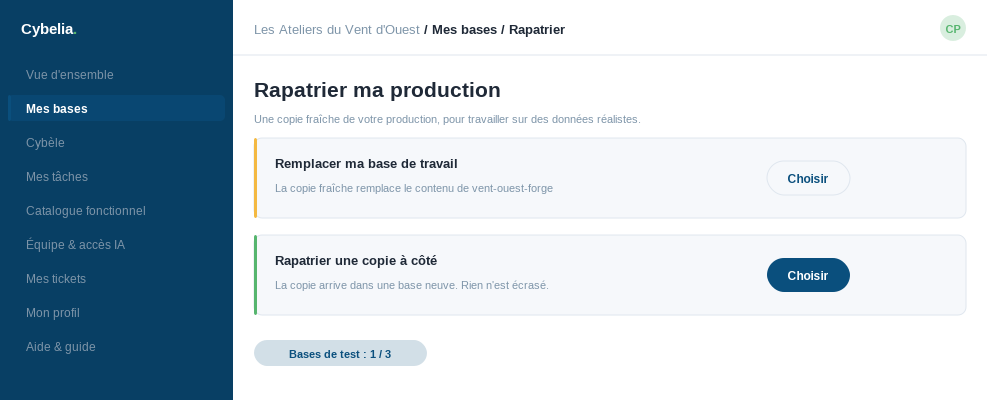 The two routes side by side: overwrite the working database, or drop the copy alongside.
Path 1, update my working database
The fresh copy replaces the contents of your working database. It is the shortest path, and the only one that destroys anything: everything you have set up in that database since the last pull-down is gone. So the portal asks you to type the exact name of the database to confirm.
If you do not yet have a working database, there is nothing to overwrite: the copy creates it, and no confirmation is asked.
Path 2, pull down a copy alongside
The copy arrives in a brand-new database. Nothing is overwritten: you open both, you compare calmly, you switch over when you are ready. It uses up one of your test databases, and the quota gauge just above reminds you.
The rule that explains everything else: until a copy has become your working database, it cannot push back to your production. That right belongs to the working database, and to it alone.
If the connection is not in place yet
When Cybelia Cloud has not yet linked your production to the portal, the page shows no misleading button: it explains the situation and offers to open a ticket. The setup happens on our side, once and for all.
After you click
The pull-down takes a few minutes and runs in the background. You are sent back to the database list, where the database shows as "being prepared" with its progress bar. You may leave the page.
Sarah pulls down on the first Monday of each month, before closing the books. She always takes path 2 the first time in the year, and path 1 afterwards.
In closing
One question only, but it matters: replace your working database, or place the copy alongside. The first path is shorter and destroys your experiments; the second destroys nothing. When in doubt, take the second.
Commenting is not enabled on this course.