Documents : what the company entrusts to it
The /documents page
This is where the AI becomes useful. An assistant without your documents only knows generalities; with them, it knows your company. One screen, in the order of the action: what I have, what I am adding, what has gone in.
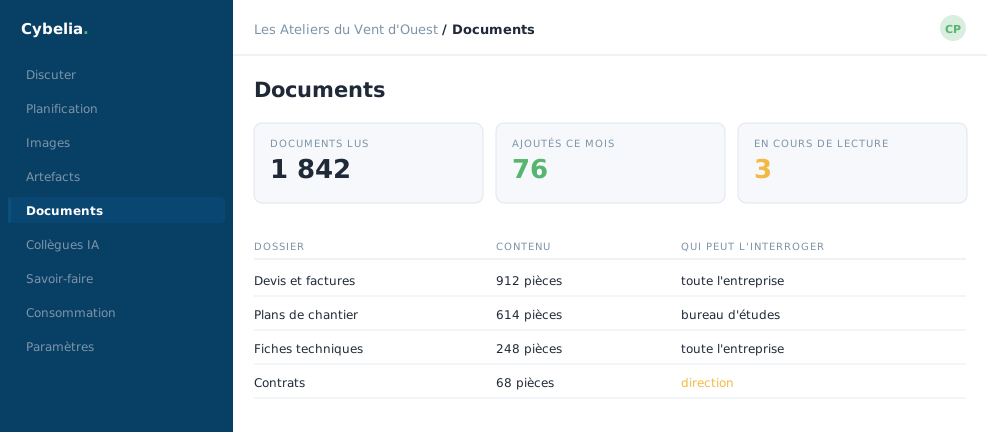 The company library, showing who may query what.
Spaces are not folders
A document is filed into a space: General, Accounting, Human Resources, Sales, Technical. A space is not storage: it is a permission. A document filed under Human Resources is read only by those holding that role, and your AI will never quote it to anyone else.
At the joinery, the company agreement sits in the Human Resources space. Tom can ask "how many days of leave do I get?" and will get the general answer. He will never see Yanis's payslip, because the partition is in place before the question, not after.
What happens after filing
- the file is read, text, spreadsheet, presentation, PDF, including scanned ones, which go through character recognition;
- it is cut into passages;
- each passage is indexed so it can be found by meaning and not only by words.
This takes from a few seconds to a few minutes. Until it is done, the document appears in the list but not yet in answers, that is normal, not a fault.
What is worth filing
Whatever is stable and shared: procedures, standard contracts, catalogues, decision minutes, reference material. Not drafts, not intermediate versions. A corpus holding three versions of a price list gives one answer in three that is wrong.
Removing a document removes it from answers immediately, including passages already indexed. That is the move to make when a price list changes: take the old one out, rather than adding the new one alongside.
In closing
This is the screen that makes the difference between a generic assistant and one that knows your house. Spaces are not folders: they decide who sees what, and that decision is made when you upload.
Commenting is not enabled on this course.