Accounts : who comes in, and with which roles
The /comptes page
Who comes into your space, and with which roles. This is an administrator's screen, and it comes down to three actions: invite, grant a role, suspend.
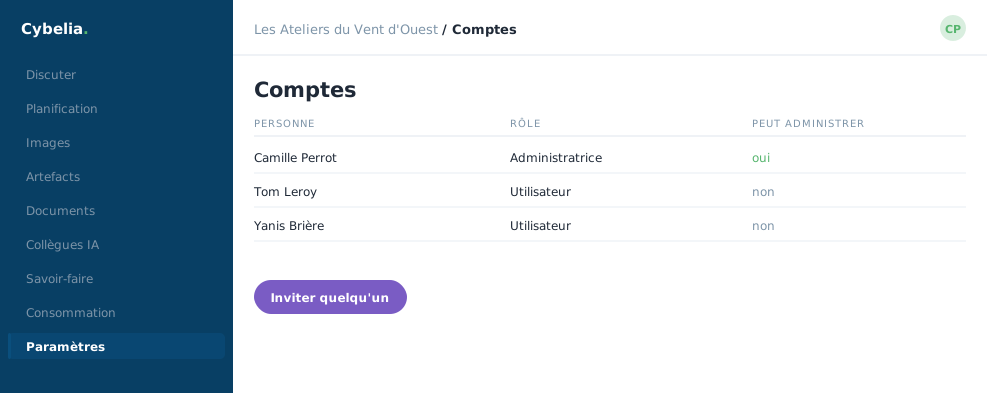 Who may administer and who may not: the column says so.
Inviting
You create the account with an address and a name; the person receives a link and chooses their own password. An administrator never sets someone else's password: they send the link. The same holds for a reset.
Roles
A role opens screens and document spaces. Giving someone the accounting role gives them access to everything filed in the Accounting space, including whatever is filed there tomorrow. The admin role also opens this page, Your AI, the connectors and the skills.
A role is a promise about the future, not only about the present. That is why you grant it thinking about what the space will hold in six months, and not only about what it holds this morning.
Suspend rather than delete
A suspended account can no longer sign in, and everything it wrote remains readable and attributable. That is the right action when someone leaves: deleting would erase the history along with the access. When apprentice Tom finishes his contract, you suspend, the questions he asked remain, and they will serve the next apprentice.
The second factor cannot be removed from here
Not by you, not by Cybelia Cloud. Someone locked out gets back in through a link sent to their own address, never through a lock taken off on their behalf. An administrator who could remove an employee's second factor could enter their account: it would no longer be a lock.
The review to do once a year
Open the list and ask one question per line: is this person still here, and is their role still the right one? Ten minutes a year. Most excess access is not malice: it is forgetfulness.
In closing
Invite, assign a role, suspend: three actions are enough. Suspending rather than deleting keeps the history readable while closing the door, which is exactly what you want when someone leaves.
Commenting is not enabled on this course.