Adopting a copy : /bases/{db}/adopter
The action that changes your reference database
You pulled down a copy alongside. You opened it, you looked at it, it suits you. The "Make this my working database" button promotes it. It appears on the database list, on copies of production, and in the "Pull down production" screen.
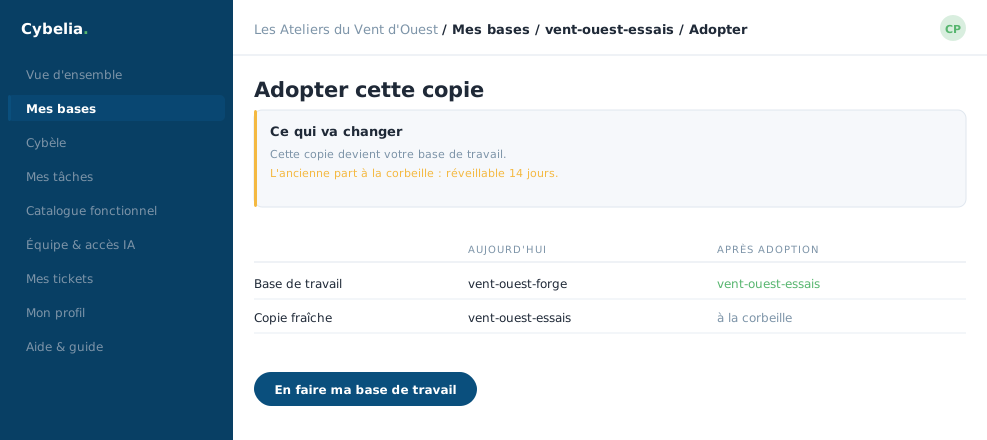 The adoption step: the copy becomes the working database, the old one goes to the bin.
What happens exactly
Three things at once. The copy becomes your working database: from now on it is the one that can push to production. The old working database goes to the bin, where it can be woken up for fourteen days. And the old one loses the right to push to production, since that right belongs to one database at a time.
Nothing is erased. The old database is set aside, not destroyed. If you realise the next day that the copy you adopted was the wrong one, you wake the old one from the bin and adopt again.
The confirmation
The portal asks you to confirm before acting: "Make this your working database? The current one will go to the bin (recoverable for 14 days)." The database name travels with the form, so clicking the wrong row cannot adopt a database other than the one you were aiming at.
When to use it
Two situations. First: you took a copy alongside to compare, the comparison convinced you, and you switch. Second: your working database has drifted away from production over the months and you would rather start again from a clean copy than replace it blind.
At Les Ateliers du Vent d'Ouest, the switch happens once a quarter, always on a Tuesday, never on a closing day.
In closing
Adopting means changing your reference database without losing anything: the old working database goes to the bin, from which it can be restored for fourteen days. It is the cautious path when you hesitate to replace.
Commenting is not enabled on this course.