Who it is for
An IT team short on time, or no IT team at all
The Security Center does not expect you to be an IT specialist. It is meant first for those who already know security concerns them, but who have neither the hours, the team, nor the tooling to make it a full-time job.
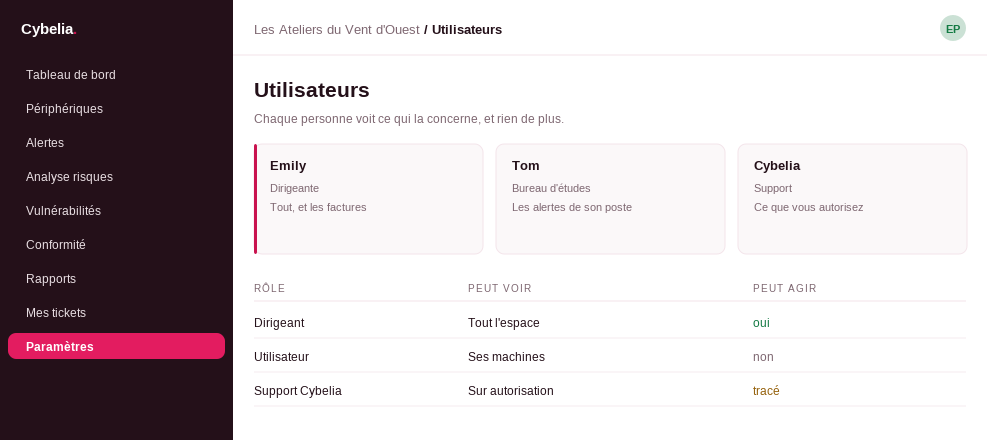 Each person sees what concerns them: the owner, the workshop, and Cybelia Cloud support.
| You are | What you come here for |
|---|---|
| Small firms with a small IT team | One or two people already handle the estate, the backups and the user accounts. Security comes last, for lack of hours. The portal gives them a watch that runs without them and asks for ten minutes a week. |
| A company with no IT staff | The owner knows they are exposed and would rather delegate. They get a dashboard readable without jargon, and someone to call when an alert lights up. |
| Audit and consulting firms | A dedicated tool to run an engagement: estate inventory, vulnerabilities, gaps against frameworks, time-stamped history. Findings export and fit into a report. |
| IT and security managers | One more console does not interest them: they want a consolidated view, alerts that do not drown the signal, and enough evidence to show their posture to a board or an insurer. |
| Penetration testers and security teams | The exposed surface, open services, missing patches, the timeline of an incident. Enough to prepare a test or work through a compromise. |
| Accountants and regulated professions | Client data to protect, a duty of confidentiality, and an insurer asking precise questions. The portal answers with dated evidence. |
| Local authorities and charities | A tight budget, shared workstations, volunteers. The priority is knowing what is actually plugged in and what is no longer up to date. |
| Industry, wholesale, transport | Machine tools, shop-floor workstations, tablets in cabs. A production stoppage costs more than a ransom: the watch covers availability as much as intrusion. |
| Health and social care | Health data, hosting to justify, traceability on demand. Every access stays on record. |
And inside a company, who opens what
Here are the four people at Les Ateliers du Vent d'Ouest, the joinery that runs through this course. Transpose the roles, not the first names.
| Who | What they do | What they open first |
|---|---|---|
| Emily management |
Wants to know in ten seconds whether all is well. Signs the contract. | The dashboard. |
| Sarah administration |
Follows the contract, the invoices and her colleagues' accounts. | My contract, My organisation. |
| Jack workshop |
Has three workstations on the floor. Wants to be told if one has a problem. | The estate, the alerts. |
| Tom apprentice |
Is learning. Clicks everywhere. That is exactly what to do. | The help centre. |
Looking breaks nothing. The vast majority of screens are read-only: you consult, filter and export. The gestures that change anything are few, always confirmed by a dialogue, and reserved for those entitled to make them.
And if I click something I do not understand?
Nothing serious will happen. Many technical words in the portal are underlined: a "?" button at the top right turns on explanation bubbles. Hover over the word and the definition appears. And if doubt remains, the help centre holds a full glossary, in your language.
Nobody expects you to know everything. What is expected is that you know where to look, and whom to call.
In conclusion
The Security Center replaces neither an IT team, nor a provider, nor an auditor: it gives them all the same view, kept current without effort. If you recognised yourself in one row of the table, the rest of this course walks through the portal screen by screen, starting with the vocabulary.
Commenting is not enabled on this course.